
An additional layer of security with 3DS
3DS (3D Secure) is an additional layer of security and fraud protection for card payments. Here is what it means for your agency and your customers, and where it is available in TravelPay.
What is 3DS?
With 3DS, the card issuer (the bank that issued the card) may require the cardholder to enter a code when making a payment. The card issuer usually sends the code to the cardholder by SMS, and the cardholder enters it on the payment page to confirm that the card is theirs. Once the card has been verified, the payment is authorised and the transaction is completed.
3DS applies on all payment pages where the cardholder is processing the payment themselves, as the code can only be received and entered by them. The card issuer decides whether the cardholder is challenged to enter a 3DS code, based on various fraud control algorithms.
Remember: not all credit cards are 3DS enabled. This is at the discretion of the credit card issuer.
Benefits to merchants
- Reduced chargebacks: 3DS removes liability for many ‘unauthorised’ disputes.
- No cost or effort to implement.
- An additional layer of security.
- Greatly reduces fraudulent transactions.
Benefits to cardholders
- Enhances card security.
- Increases customer confidence when making payments.
- Easy to use.
- Reduces unauthorised transactions.
How does it work?
3DS is triggered during the transaction process. Here is how the flow looks:
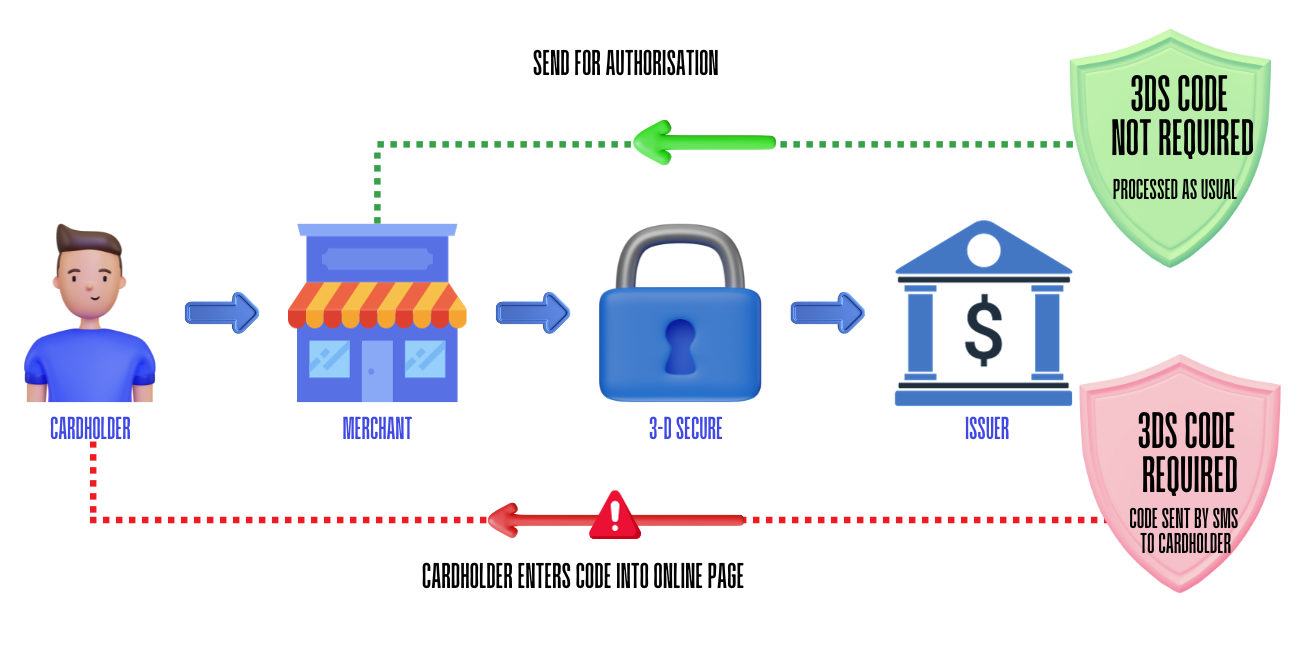
- The cardholder paysYour customer enters their card details on the merchant’s payment page.
- 3-D Secure checks with the issuerThe payment passes through 3-D Secure to the card issuer, whose fraud controls decide whether a code is needed.
- No code requiredThe payment is sent for authorisation and processed as usual.
- Code requiredThe issuer sends a code by SMS to the cardholder, who enters it into the online payment page before the payment is authorised.
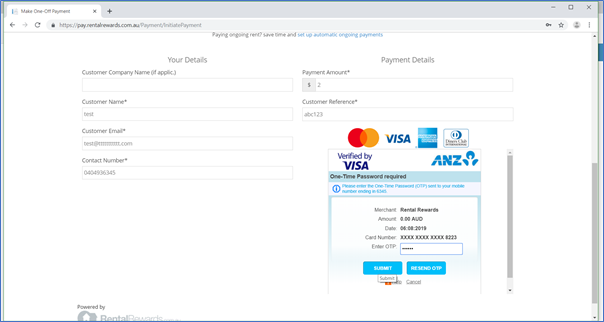
3D Secure is a huge leap forward in the world of online payments. Not only does the technology offer smoother shopping experiences, it also takes online payment security to a whole different level, ensuring a safer and more reliable experience for both customer and merchant.
Where is 3DS available in TravelPay?
Available
- All customer payment pages hosted by TravelPay (the URL contains ‘pay.travelpay.com.au’).
- Software using the TravelPay Payment Plugin integration, including VTO, PowerSuite, EventsAir, Lemax and Odysseus.
Not available
Integrations that use card APIs, including the Tramada ‘Pay Now’ invoice customer payment integration.
Payment pages designed for travel agents to use, such as the Merchant Payment Portal. Only use it for card payments when the card is sighted by the consultant processing the transaction.
FAQs
Who triggers the 3DS process?
3D Secure is triggered by the card issuer in order to provide extra protection against unauthorised use of a card.
What happens if my customer doesn’t receive an SMS?
They will need to contact their card issuer to ensure that their contact details are correct for 3D Secure. Some banks have not implemented 3D Secure.
What if the cardholder does not get a code?
The 3DS ‘enter your code’ fields will automatically appear when 3DS is supported and it is presented by the bank that issues the customer’s card. The bank’s fraud algorithm decides whether to 3DS challenge the cardholder or not.
Is 3DS available with all card types?
3DS is available for Mastercard, Visa and American Express cards, but whether it is configured for all cards, and whether a code is required, is at the discretion of the card issuer.
Why do some transactions require 3DS and some don’t?
The card issuer determines whether the cardholder is challenged to enter a 3DS code based on various fraud control algorithms.
TravelPay does not determine whether the cardholder is 3DS challenged, does not determine whether the code entered is correct, and does not decide whether the transaction is approved.
What if a customer says they don’t want to enter a code and would prefer you to process their payment instead, e.g. over the phone?
Under no circumstances should you process credit card payments over the phone without sighting the credit card.
How does a cardholder know if they have 3D Secure?
A cardholder will have to contact their card issuer if they wish to verify that their card requires 3D Secure.
Will the same code be used every time?
No. Verification codes are one-time only. The card issuing bank will send your customer a new one each time.
What if the code doesn’t work, or the correct code was entered but the transaction was still declined?
Customers should contact their card issuer to determine the reason the payment was declined.
What payment pages and software integrations have 3DS available?
3DS is available:
- on all customer payment pages that are hosted by TravelPay (the URL will contain ‘pay.travelpay.com.au’); and
- if your software uses the TravelPay Payment Plugin integration. This includes VTO, PowerSuite, EventsAir, Lemax and Odysseus.
What payment pages and software integrations do not have 3DS available?
Integrations that use card APIs do not currently support 3DS. This includes the Tramada ‘Pay Now’ invoice customer payment integration.
3DS is also not available on payment pages that are designed for travel agents to use, e.g. the Merchant Payment Portal. The Merchant Payment Portal should only be used for processing card payments when the credit card is sighted by the consultant processing the transaction.
To ensure 3DS is available, use a payment page that is hosted by TravelPay. The URL will contain ‘pay.travelpay.com.au’.
Are there other names for 3DS?
3D Secure is also known as Verified by Visa, Mastercard SecureCode and American Express SafeKey.
Want 3DS on every customer payment?
Send customers a TravelPay-hosted payment link (pay.travelpay.com.au) and 3DS is built in. Talk to our team to get set up.